
In this article
To plan a GIF that loops cleanly, pick one movement, sketch its return and keep the rest of the scene fixed. Once you have an export, watch the transition back to the first frame at the size where people will see it. A clear motion brief gives you a way to judge the result and request a specific revision.
What the Images 2.6 release adds
OpenAI highlighted animated GIFs in its November 4 Images 2.6 announcement. Its ChatGPT Images help page describes GIF creation as rolling out in ChatGPT. Check your workspace for the feature before committing a production schedule. You can use the storyboard below to brief any workflow that supports short animation.
Sketch three poses for a single action
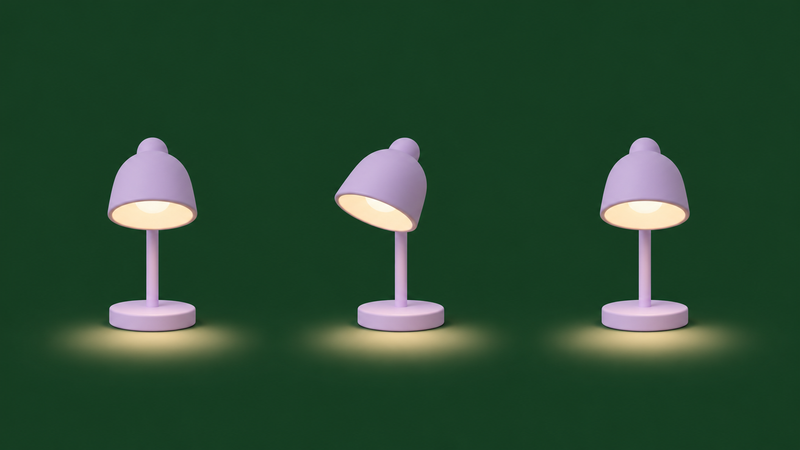
Imagine a lilac desk lamp for a fictional stationery campaign. It begins with its shade facing forward. The shade tips left and the pool of light follows. Then the shade returns to its starting angle. Those are three reference poses for one action. The movement between them can use as many frames as the animation needs.
Sketch the positions on paper or place them in a review document. For each pose, write down where the lamp base sits and where the light lands. If a reviewer sees the base shift between poses, they can flag it before anyone spends time generating motion. Agree on which pose reads best as a still image.
Specify what should stay fixed
A compact brief for the lamp might read, “Use a fixed front view. Keep the lilac finish, base position, background and crop consistent. Tilt the shade gently to the left and let the pool of light follow. Return both to their opening position with an even rhythm.”
Keep that brief with the approved reference. If the first draft introduces an unwanted change, name the change and its location. For example, if the crop tightens on the return, ask for the same framing through the end of the loop. Save the accepted pose reference separately so it remains available for the next revision.
Watch the join across several repeats
Play the export several times. Follow the shade and the edge of the light as the last frame meets the first. A position jump suggests the return has missed the start pose. An extra pause can happen when similar end and start poses each hold. When the position looks right but the join still feels abrupt, look at the direction and speed on either side of it.
Write down the symptom and adjust one part of the motion at a time. Watch again after each adjustment so you can tell which change helped.