
In this article
Start with PixVerse text to video when the look of the shot is still open. Start from an image when you already have an approved composition or a product photo whose visible details matter. You can use either route to explore motion. Decide what the first frame needs to establish before you write the prompt.
Decide what the shot must prove
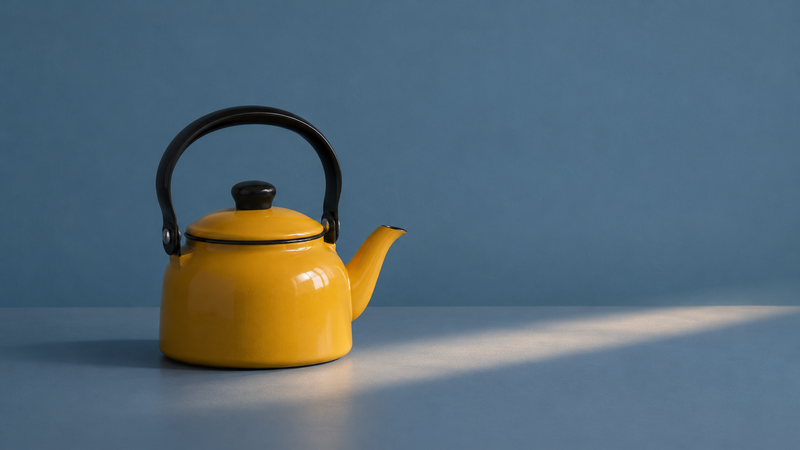
PixVerse describes its text workflow as a way to specify the subject, action, camera and light in writing. Its image workflow lets you begin with a still and describe how it should move. Imagine a six-second tabletop shot of a mustard-yellow enamel kettle. If the team is still deciding how a kitchen campaign should feel, the shot can test whether blue and yellow make a good pairing. If the same shot is for a product page with an approved kettle photo, the handle, lid, spout and finish matter. Write down those priorities before comparing outputs.
Start from text when the design can change
For the concept, try: “A mustard-yellow enamel kettle with a black handle sits on a matte blue tabletop. Side light slowly brightens from the right. Fixed camera, three-quarter view. Hold on the kettle at the end.” This is a brief for a hypothetical shot. It gives the clip one action and makes the change easy to judge. If the first draft introduces unwanted camera movement, keep the lighting direction and simplify the camera instruction in the next pass. Preserve the same duration and framing where possible so you can see what the change did.
Start from an image when the product is approved
Use the approved three-quarter photo as the input. Describe movement in relation to that frame: “Keep the kettle and camera still. A soft band of light travels slowly across the tabletop. Hold the final composition.” The starting image gives the tool a concrete reference. It cannot guarantee that the design stays consistent throughout. An angle change that reveals an unseen side asks the model to invent more of the product. If that side needs to be exact, use another approved view or produce the angle with source footage.