
In this article
To soft proof AI art, preview it with the color profile for the intended print conditions and check whether the details you care about still read clearly. Adjust a print copy and review a physical proof before approving the run. Adobe’s print preparation guide explains that soft proofing simulates the color and tone limits of a printing setup. The preview also depends on your monitor and viewing conditions.
Get the profile for the actual job
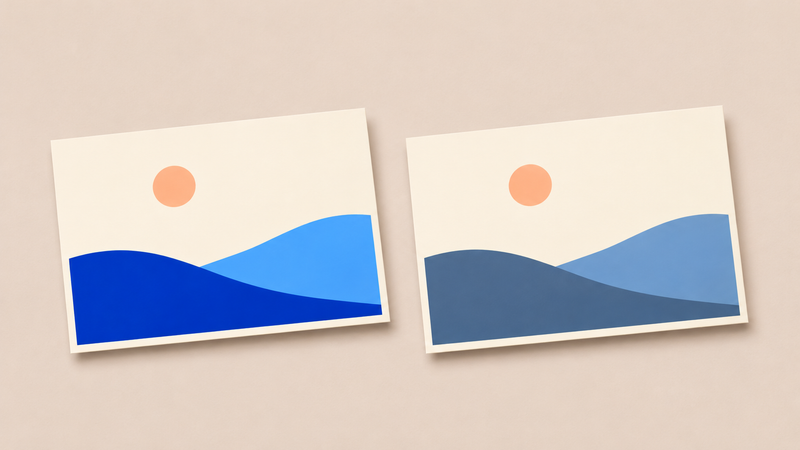
Imagine a postcard with two blue coastal hills, a peach sun and a dark strip of shore. You want a stack on matte paper and a digital version for the event page. Ask the print provider which profile to use for that paper and printing process. Also ask what file format and color settings they expect for delivery. The preview and the file you send are two decisions to confirm.
Save a print copy with its own name, and keep the source artwork with its embedded profile. In your editor, select the print provider’s profile for the soft proof. Switch the proof view on and off to compare the same artwork at the same size.
Decide which differences matter
Look first at the two blue hills. If their colors come closer together in the preview, check whether you can still see where one ends and the other begins. Next look at the dark shore and see whether it still has the detail you want. Check the sun in relation to both blues. The image can keep its visual hierarchy even if the blues are less vivid.
Adobe’s gamut warning guide explains how a warning can highlight colors outside the selected output range. Use it to locate areas to inspect. Toggle the overlay off to judge how those areas look in the picture.
Adjust a print copy selectively
If the hills merge, try a small brightness or saturation change on one hill and compare again in the proof view. If the shore loses detail, test a local adjustment there. Keep the untouched print copy or use editable adjustment layers so you can undo a change. Look at the whole postcard after each adjustment to see whether it still feels like the same design.