
In this article
Use Photoshop Remove related elements when an object should disappear along with its shadow, reflection or other visible trace. Before applying it, identify the traces that belong to the object and the ones that describe the rest of the scene. A convincing cleanup leaves the shelf, glass and remaining products looking like they share the same light.
Check what changed in Photoshop
Adobe lists the upgraded Remove tool in its November 2026 Photoshop desktop release. Adobe Help describes a Remove related elements option with generative AI and cloud processing enabled. It asks you to loop around the object and creates the edit on a separate layer. Adobe documents shadows, reflections and ripples among the effects the tool can address. The following shop-window example is a review workflow for judging the output.
Map the prop and its traces first
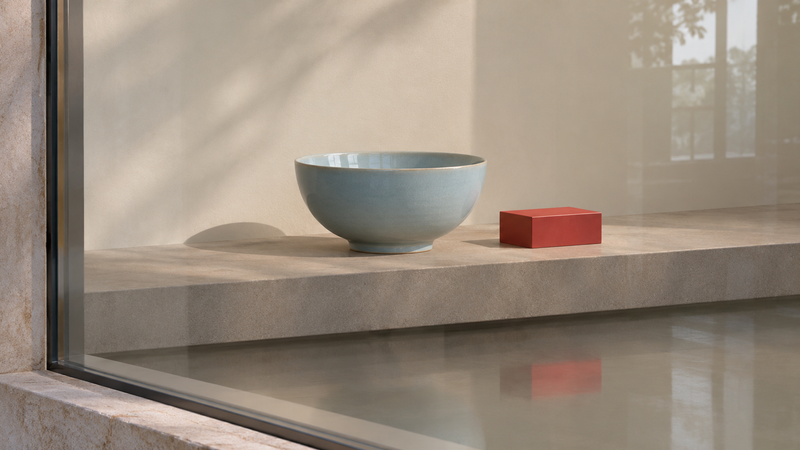
Imagine a pale blue ceramic bowl on a warm gray shelf behind glass. A small red display block needs to go. Below the shelf you can see a softened red reflection, while a faint window highlight crosses another part of the glass. Mark three areas on a temporary note layer: the block, its reflection and the long highlight you want to keep. If you also see a short dark shape touching the red block, follow its edge before deciding whether it belongs to the block or the bowl. The original image is your reference for these relationships.
Apply the edit and compare at the same zoom
Choose Remove related elements and loop around the unwanted block as Adobe’s guide describes. Toggle the resulting layer on and off without changing zoom or crop. Check where the block sat, the area with the red reflection and the edge of the bowl. A clean edit should leave the shelf edge continuous and preserve the lighting that makes the bowl feel grounded. Look for a red tint in the reflection and any change in the width or continuity of the window highlight. View the whole composition too, because an even patch can look unusually flat when you zoom back out.
Repair only the area that still needs work
If the block is gone and only a small red patch remains, work on that patch separately. Sample from nearby glass with a similar brightness or use a small selection and check the resulting transition at its edges. If the edit erased the bowl’s contact shadow or interrupted the shelf edge, compare with the original and recover the intact part using a layer mask. Keep the original and the removal layers in the working file. For a photographic product page, compare the approved product and nearby reflections before exporting.